
Version 1.2.10, Effective 1/10/2026
This Manual Is For
- Motor Carrier Owners
- Operations Managers
- Job Managers (lesser extent)
1. Getting Started
- Setup link: https://slipseat.com/maude-setup/
- Setup time: about 10 minutes for an Operations Manager or Carrier Owner
- Info needed: General operational knowledge, DOT, EIN, staff phones & emails
- Abilities Needed: The ability to create company emails
- Steps during setup:
- Create an account
- Define operations & staff
- Select a plan
- Once SlipSeat approves the carrier, the Ops Manager can access Maude through their Task Inbox and Maude Dashboard
2. Roles and Access
- Operations Manager
- Operations Manager creates job ads and is the ultimate decision maker for hiring
- Only Carrier role that requires an account
- Must be logged in to:
- Create and post job ads
- Access Maude Dashboard
- Reschedule interviews
- Generate offer letters
- Other Carrier Personnel
- Receive tasks & Maude access via Task Inbox (email-based)
- Job Managers – Manage job process and approve applicants for offers
- Stage 1 Interviewers – Conduct remote interviews
- Stage 2 Interviewers – Conduct onsite interviews
- Road Test Examiners – Ensure drivers can safely operate equipment
- Receive tasks & Maude access via Task Inbox (email-based)
- Applicants
- Must create an account
- Receive emails from Maude and access a workflow inbox for tasks
- Do not access Maude directly
3. How Maude Works
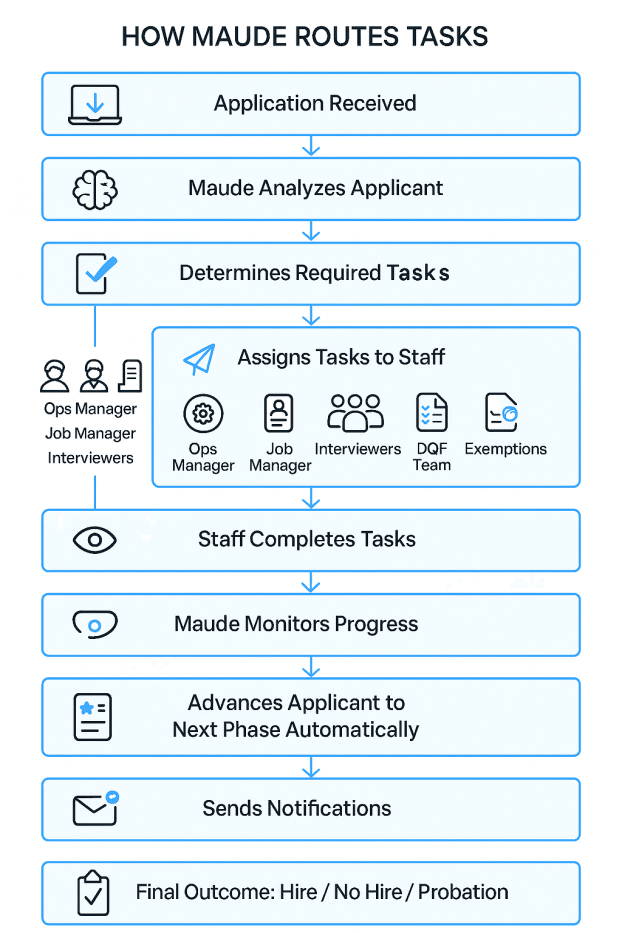
- When an application is received, Maude will begin emailing staff with tasks
- Tasks are assigned to personnel based on function
- A staff member may have more than one function
- For example, the Ops Manager may also be the Job Manager and an interviewer
- Each task appears in the Task Inbox which is accessible via email link
- Tasks remain assigned until completed
- If a user tries to access a task not currently assigned to them, it will appear blank
4. Hiring Pipeline Automation
At first, Maude behaves like a DOT trained, web enabled, AI chatbot. But once workflows are activated, she becomes the orchestrator of the carrier’s hiring pipeline.
- Why it matters: Hiring truck drivers is complex. Applications differ from other professions. Drivers must be screened, backgrounds checked, employment verified, and drug tests passed. Otherwise, carriers face serious fines from the DOT.
- Traditional: Filling a truck driving position can easily consume 40 hours or more.
- With Maude: Carriers can reduce workload by as much as 75% by streamlining:
- Job Ad Generation & Placement
- Application Intake & Analysis
- Remote Interview Processes
- Onsite Interview Processes
- Road Test Examinations
- The Selection Process
- Driver Qualification File (DQF) Paperwork
5. Workflow Stages
Maude’s Hiring Process consists of a 2-Stage interview process, with a road test being optional for the onsite interview. Advancing a candidate to the next Phase can be as simple as a 1-click process.
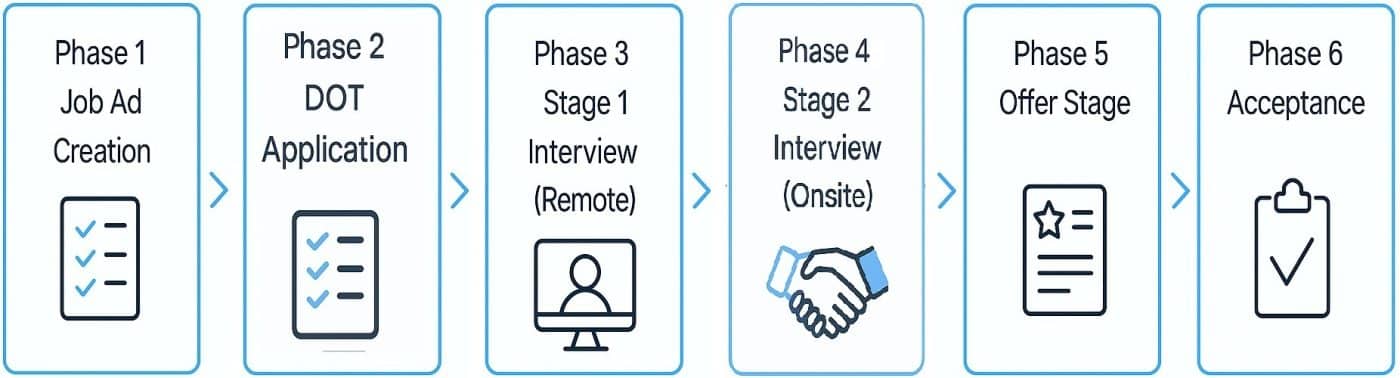
Phase 1: Job Ad Creation & 30-day Placement
- Operations Manager creates Job Ad and assigns a Job Manager
- Maude posts Job Ad on SlipSeat for 30 days and generates link for external sites
- Indeed, Craigslist, LinkedIn, etc.
- Info saved for reuse
- Turns similar future job ad creation into a simple task with as few as 3 clicks
Phase 2: DOT Application
- Applicant completes AI-enabled DOT application
- Info saved for reuse
- Saves ~30 minutes per future application
- Maude sends a Thank You email to Applicant on behalf of carrier
- Maude analyzes Applicant to job and company specifications
- PSP Authorization is collected
- Pre-employment Exemption paperwork is generated
- Saves the motor carrier about $50 per pre-employment drug test
Phase 3: Stage 1 Interview (Remote)
- Job Manager reviews Analysis and Application and approves Applicant for an interview
- If approved, Job Manager selects Stage 1 Interviewer
- Maude sends email to Applicant to choose 3 dates/times
- Maude emails the choices to the Interviewer for Approval
- When approved, Maude emails Confirmations to participants
- Maude sends 15 Interview Questions with Analysis and evaluation form to Interviewer
- When completed, Maude sends evaluation to Job Manager for Approval
Phase 4: Stage 2 Interview (Onsite)
- Job Manager selects up to two Interviewers + Road Test Examiner
- Job Manager proposes three dates/times for Stage 2 Interview
- Maude emails Applicant to choose from the three proposed dates
- Maude emails Applicant’s choice to Job Manager for final Approval
- Maude emails a confirmation to all parties, providing interview packets (with new questions) and evaluation forms as warranted
- If applicant passes Road Test, Examiners also certify driver
- Results are sent to Job Manager
Phase 5: Offer Stage
- With evaluations in hand, the Job Manager Approves the applicant for the Offer Stage
- Maude notifies Operations Manager who reviews Applicant Dashboard
- Maude reanalyzes match based on the Operations Manager’s direction
- Operations Manager decides disposition: Hire / No Hire / Probation
- Maude generates appropriate letter
- Operations Manager edits and submits letter
- Maude emails Applicant, copying the Operations Manager and DQF team if appropriate
Phase 6: Acceptance
- Applicant clicks link or scans QR code to accept offer
- DQF Paperwork is generated
- Maude emails DQF docs to DQF team and Operations Manager
- If the Application times out (after 30 days) or is rejected, Maude emails applicant a soft rejection so the driver isn’t ghosted
6. Unit Based Pricing Model (Maude)
Billing is based on three components – Job Ads, Applications, and User Access. Each component carries a cost of 1 or 2 units per month, with a carrier’s commitment length determining per unit cost.
Per Unit Cost
| Component | Units |
|---|---|
| Job Ad | 1 Unit |
| Application | 1 Unit |
| First User (Ops Manager) | 2 Units / Month |
| Additional Users | 1 Unit / Month |
Users are allocated 1,000,000 Tokens each month which is enough to write a 3,000 page book. Additional Tokens may be purchased in blocks of 1,000,000 for 1 unit each.
Starter Packages
| Commitment | Unit Price | Savings | Money Back Guarantee* | 25 Units | 50 Units | 100 Units | 250 Units |
| No Commit | $100 | — | — | $2,500 | $5,000 | $10,000 | $25,000 |
| 1 Year | $75 | 25% | 30 Days | $1,875 | $3,750 | $7,500 | $18,750 |
| 2 Years | $60 | 40% | 60 Days | $1,500 | $3,000 | $6,000 | $15,000 |
| 3 Years | $50 | 50% | 90 Days | $1,250 | $2,500 | $5,000 | $12,500 |
* Money Back Guarantee applies to unused credits from Starter Packages
7. Ops Assistant Features
Operational Intelligence
- Recommends truck routing based on real-time weather and traffic
- Helps optimize staffing and scheduling
- Benchmark operations data
- Develop pricing models
- Search load boards
- DOT regulation quoting
Document & Communication Automation
- Read, analyze, and draft emails and documents
- Generate logo and website images
- File conversions
Regulatory & Contract Support
- Drug and Alcohol Policies
- Privacy Statements
- Non Disclosure Agreements
- RFQs/RFPs
- Employment Contracts
- Customer Agreements
- Contractor Agreements
- Lease Agreements
8. Integration
Maude is a self-contained turnkey DOT complaint hiring system for motor carriers who is also a very handy Operations Assistant.
- You still need your current Background Investigations and Drug & Alcohol processes
- You still need to check the Clearinghouse (for now)
- Although Maude can analyze MVRs, you still need to run them (for now)
- You still need a pool
- Maude will generate a Pre-employment Exemption if desired and email it to the current employer when requested, but you still manage the process, reviewing responses and sending applicants for drug screens where applicable
- Maude will email past employers (up to three times, if necessary) for employment verification, but you still manage the process
9. Future Roadmap
Planned automations include:
Stage 1: Calendar functions; Drug & Alcohol and Background Investigation paperwork
Stage 2: PSP & MVR Automation; Clearinghouse & HireRight Integrations
Stage 3: Payroll; COBRA
10. What Maude Does NOT Do
- Maude does not replace your trucking or labor attorney
- Maude does not replace your TMS, DMS, or ELD provider
- Maude does not override your MRO or DOT, DOL, OSHA, or FDA regulations
- Maude does not make hiring decisions, qualify drivers, or manage HOS
- Maude does not run payroll (yet)
11. Performance
Most actions run in deep mode over a secure connection and can take 20 seconds to 30 seconds to process. Avoid using the back button or refreshing your screen while Maude is working, or you may lose your work.
That being said, if Maude takes more than two minutes to respond, that’s highly unusual. You might be on a webpage that has been open for days. If that is the case, you have likely lost the secure connection and may need to refresh your screen.
12. Why Maude Is Safe AI
Maude is the result of several thousand hours of development. She is split into two parts, a free form DOT trained, web enabled AI chat bot and a forms engine/workflow processor. The latter is responsible for managing workflows, generating and emailing correspondence, and delivering the DQF docs, and, as a result, it is very tightly bound which greatly reduces the chance of Maude hallucinating.
Additionally, Maude cannot take actions outside the defined workflow steps, which further mitigates unexpected or unauthorized behavior.
- Bounded workflows
- DOT‑trained
- Minimal hallucination risk
- Human approval at every decision point